Mapping a Home Network with Mermaid Diagrams
As home labs grow, it becomes increasingly difficult to remember how everything fits together. A simple network may start with a router and a few devices, but before long it can include servers, media systems, smart home devices, security cameras, mesh Wi-Fi nodes, and cloud-hosted services.
One of the easiest ways to document this kind of environment is with Mermaid diagrams. Mermaid is a text-based diagramming language that allows you to describe infrastructure using plain text and automatically generate clean visual diagrams. Because diagrams are stored as text, they are easy to version control, update, and include in documentation, runbooks, Git repositories, or knowledge bases.
For my own home network, Mermaid provides a convenient way to document the relationships between:
- Internet connectivity
- Mesh Wi-Fi infrastructure
- Wired network equipment
- Home lab servers
- Media services
- Security systems
- Smart home devices
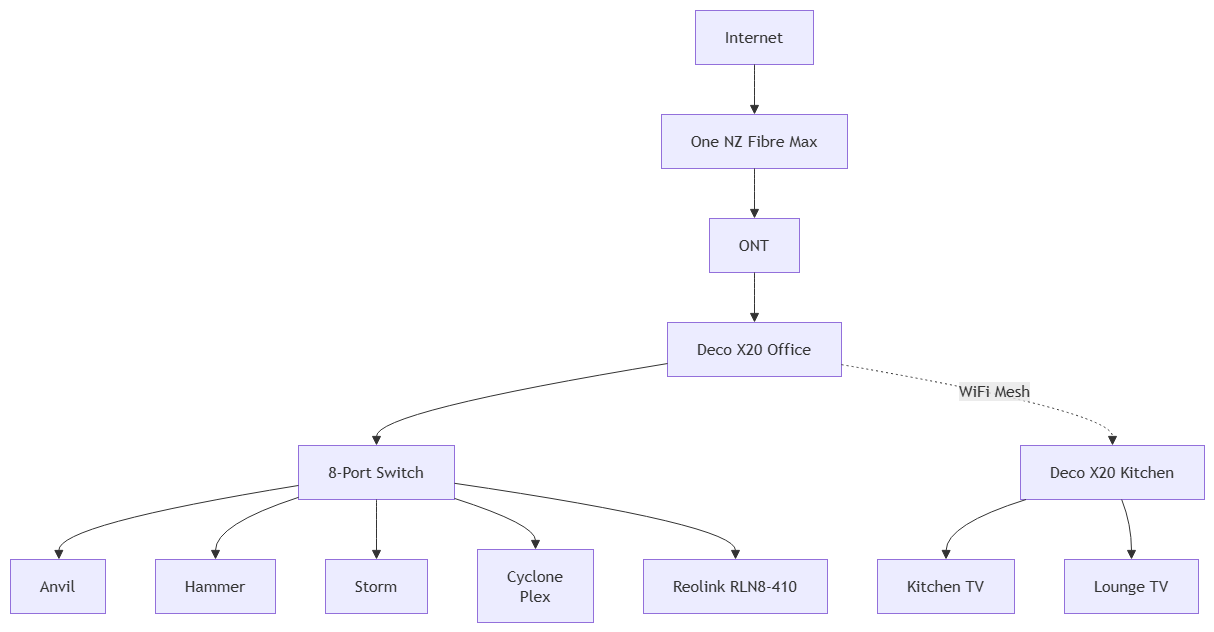
The network is built around a fibre internet connection feeding a TP-Link Deco mesh system. The primary Deco unit acts as the gateway and is connected to an unmanaged gigabit switch. A secondary Deco node extends wireless coverage using Wi-Fi backhaul.
Connected to the wired network are several systems that form the foundation of a growing home lab:
- Anvil - an older gaming PC repurposed as a server.
- Hammer – a former photo-management server that is currently available for rebuilding.
- Cyclone – a mini PC currently running Plex media services.
- Storm – a desktop workstation.
- Reolink RLN8-410 – a network video recorder supporting multiple wired security cameras.
The wireless network supports everyday client devices, media endpoints, and smart-home equipment, including laptops, phones, Chromecasts, smart appliances, lighting, and speakers.
One of the biggest advantages of Mermaid is that documentation can evolve with the environment. As systems are rebuilt into a future Proxmox-based home lab, the diagram can be updated by changing a few lines of text rather than redrawing an entire network diagram.
A simplified Mermaid example of the current network looks like this:
graph TD

    Internet[Internet]
    Fibre[One NZ Fibre Max]
    ONT[ONT]

    Office[Deco X20 Office]

    Kitchen[Deco X20 Kitchen]

    Switch[8-Port Switch]

    Anvil[Anvil]
    Hammer[Hammer]
    Storm[Storm]
    Cyclone[Cyclone<br/>Plex]

    NVR[Reolink RLN8-410]

    KitchenTV[Kitchen TV]
    LoungeTV[Lounge TV]

    Internet --> Fibre
    Fibre --> ONT
    ONT --> Office

    Office --> Switch
    Office -. WiFi Mesh .-> Kitchen

    Switch --> Anvil
    Switch --> Hammer
    Switch --> Storm
    Switch --> Cyclone
    Switch --> NVR

    Kitchen --> KitchenTV
    Kitchen --> LoungeTV
Which produces a digram tht looks like
For home lab enthusiasts, Mermaid sits in a sweet spot between handwritten notes and enterprise network management platforms. It is simple enough to maintain by hand, yet powerful enough to describe complex infrastructure, making it an excellent tool for documenting both current environments and future architectural plans.